Generic Webhook
The Generic Webhook accepts alerts from any monitoring tool or script that can post JSON. You map your tool's payload to a few Oppex fields, and request headers tell Oppex which statuses create incidents, which resolve them, and what severity to use. The Datadog and Splunk pages are worked set-ups of this webhook.
Before you start
You need the following:
- An Oppex API key from the workspace that owns the service. Open Settings, and in your workspace's section click API Keys. If your organization has only one workspace, click Organization → API Keys instead. See API Keys to create one. One key can serve several tools.
- The service's integration key, to send alerts to one service. The Generic Webhook guide's sample request contains it, as described in step 1.
- A tool that can send custom headers. If your tool cannot, it can send the API key with HTTP Basic authentication instead, as described in "Authenticate without custom headers".
Step 1: Open the Generic Webhook guide in Oppex
- Open Services.
- In the service's row, click Integration Details and select Generic Webhook.
- Copy the Webhook URL from Build the webhook payload, and the service key from the sample request in Test your integration.
The webhook URL is the same for every service:
https://api.oppex.ai/integrations/webhook/incident/generic
Step 2: Configure the request headers
Oppex uses request headers to authenticate the request and to decide how it handles each alert.
| Header | Required | Description |
|---|---|---|
X-GE-API-KEY | Yes | Your Oppex API key |
X-GE-SOURCE | Yes | The label shown as the incident's source, for example Generic |
X-GE-AUTORESOLVE | No | Set to true to resolve incidents when a resolved status arrives |
X-GE-STATUS-TRIGGERED | No | Comma-separated statuses that create incidents, for example DOWN,CRITICAL. If absent, every request creates an incident |
X-GE-STATUS-RESOLVED | No | Comma-separated statuses that resolve incidents, for example UP,OK |
X-GE-STATUS-SEVERITY | No | A JSON map of status to severity, for example {"CRITICAL": 1, "HIGH": 2, "MEDIUM": 3, "LOW": 4}. The body's severity field takes precedence |
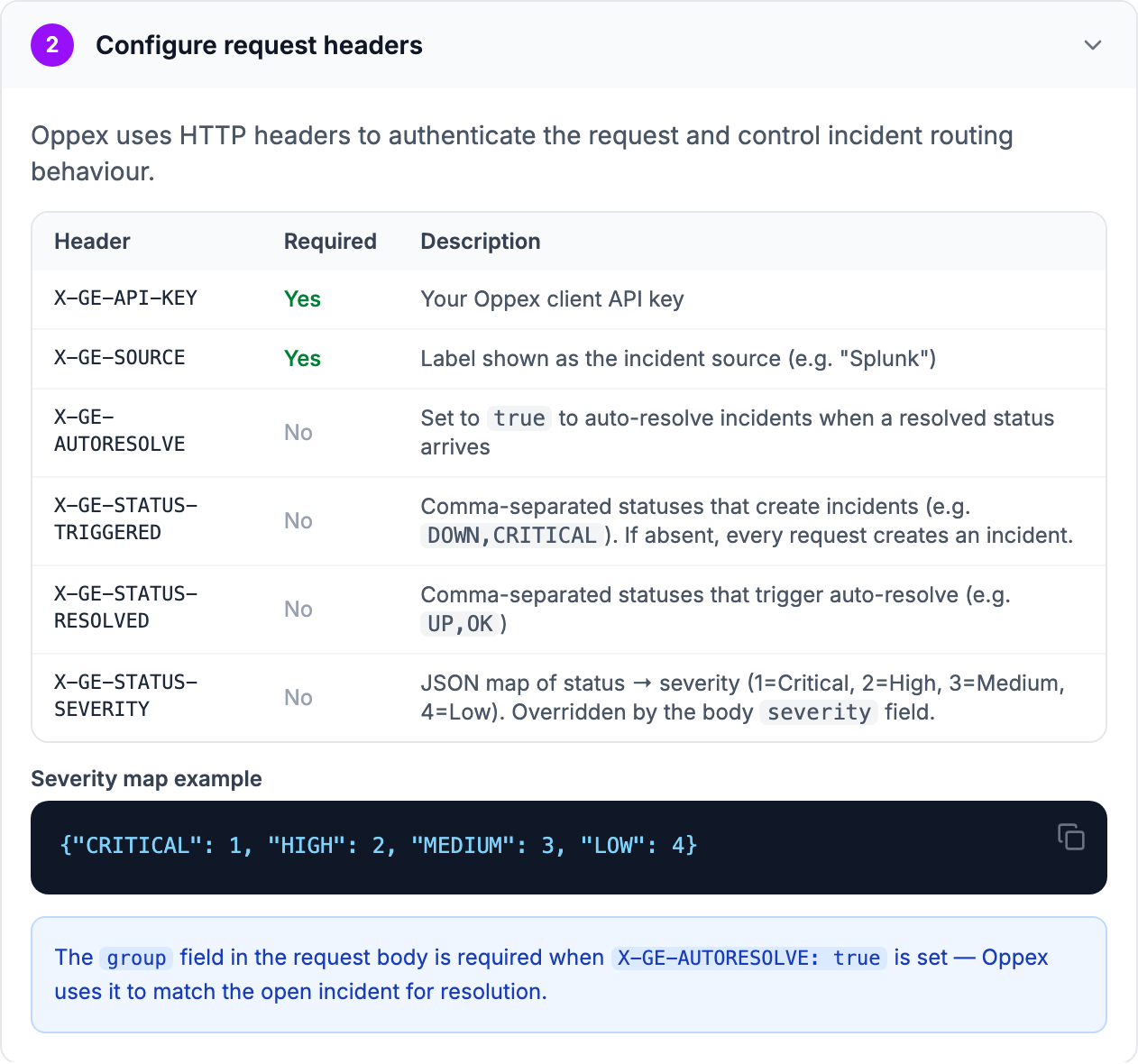
Status lists are matched as exact values, ignoring letter case.
Oppex links a resolved status to its incident through the group field only for sources it
recognises. Set X-GE-SOURCE to Generic to use auto-resolve. With a custom label such as
MyMonitor, Oppex drops the group: resolved statuses cannot find the incident and are rejected with
"No open incidents found for group", and repeated alerts open new incidents. To use your own label
with auto-resolve, contact Oppex support.
Step 3: Build the payload
Post a JSON body to the webhook URL with Content-Type: application/json. Every field is a top-level
key.
| Field | Required | Description |
|---|---|---|
title | Yes, to create an incident | The incident title |
status | Yes, when you use status headers | Compared with X-GE-STATUS-TRIGGERED and X-GE-STATUS-RESOLVED. If absent, Oppex reads state |
serviceKey | No | Sends the incident to this service. Without it, the workspace's service routing chooses |
group | Yes, for auto-resolve | Identifies one problem. A resolved status resolves the incidents with the same group |
severity | No | CRITICAL, HIGH, MEDIUM or LOW, or a number from 1 to 5 |
srcTimestamp | No | When the alert happened, in epoch milliseconds, as a number or a string of digits |
tenant | No | A tenant name |
type | No | The incident type |
externalID | No | The alert's ID in your tool |
component | No | The affected component |
detailsJSON | No | Extra context, as a JSON string |
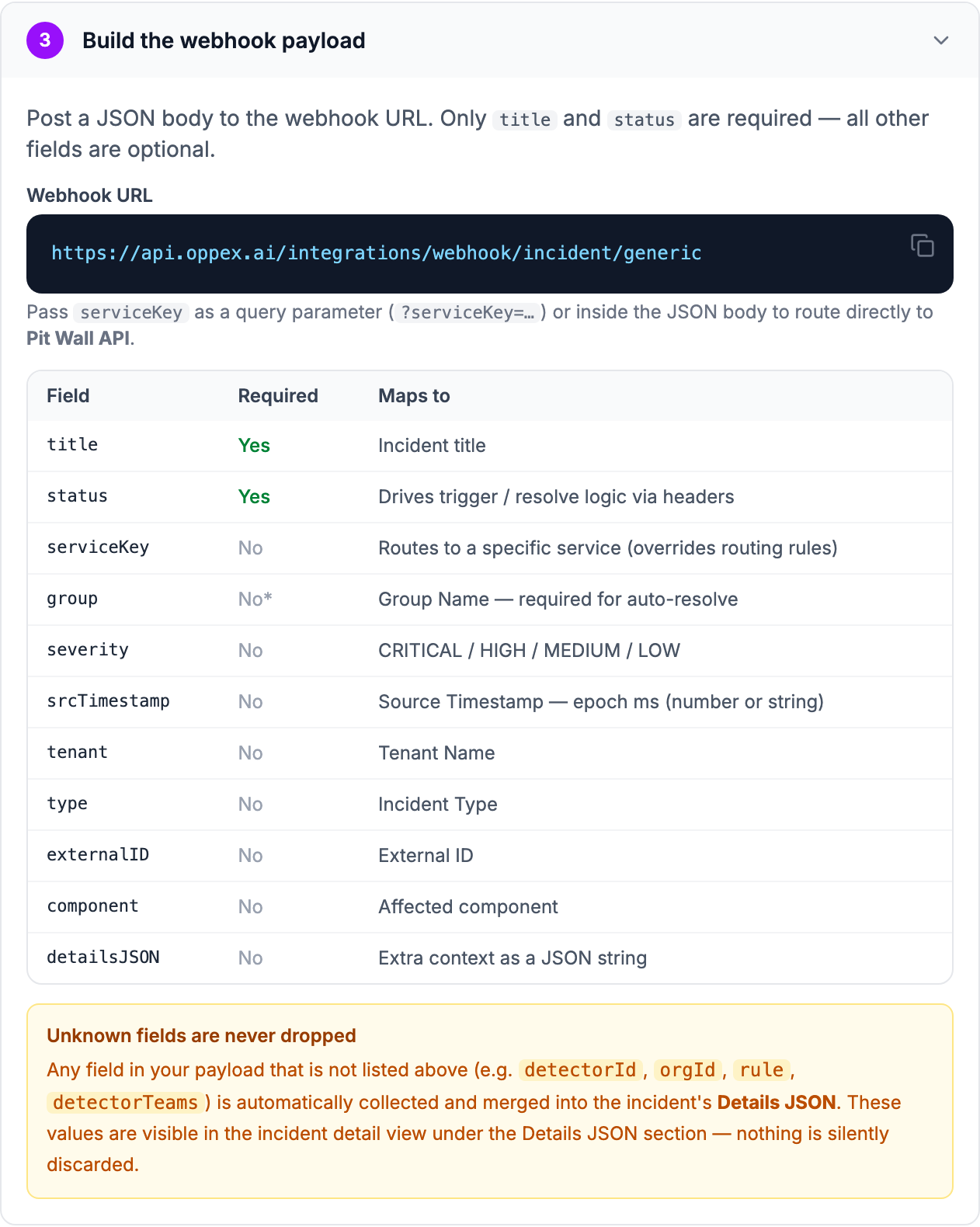
The in-app guide says that you can pass serviceKey either as a URL parameter or in the body. For
the Generic Webhook, only the body works. A serviceKey in the URL is not used, and the incident goes
to the service that your workspace's service routing chooses.
Any other field in your payload is kept in the incident's details. Nothing you send is discarded, so you can include your tool's own fields, such as a link back to the alert.
srcTimestamp accepts epoch milliseconds only. Oppex ignores an ISO-8601 time in this field and
records the time it received the alert instead. A value in epoch seconds is read as milliseconds,
which places the alert in 1970.
How Oppex handles each request
Oppex checks each request in this order:
- If
X-GE-AUTORESOLVEistrueand the status is inX-GE-STATUS-RESOLVED, Oppex resolves the incidents with the samegroup. The request must includegroup. - Otherwise, if
X-GE-STATUS-TRIGGEREDis absent, or the status is in it, Oppex creates an incident. - Otherwise, Oppex ignores the request.
The severity comes from the first of these that has a value:
- The body's
severityfield. Text values other thanCRITICAL,HIGH,MEDIUMandLOWare skipped. - The status's entry in
X-GE-STATUS-SEVERITY. - Severity 1.
While an incident is open, another alert with the same group attaches to it instead of opening a
new incident. See Grouping strategy.
A resolved status resolves every open incident in your organization with the same group, not only
incidents on this service. Use group values that identify one problem, such as a host and check name,
rather than a broad value such as production.
Step 4: Test the integration
Send a sample alert. Replace the two keys first.
curl -X POST "https://api.oppex.ai/integrations/webhook/incident/generic" \
  -H "Content-Type: application/json" \
  -H "X-GE-API-KEY: YOUR_API_KEY" \
  -H "X-GE-SOURCE: Generic" \
  -H "X-GE-AUTORESOLVE: true" \
  -H "X-GE-STATUS-TRIGGERED: DOWN,CRITICAL" \
  -H "X-GE-STATUS-RESOLVED: UP,OK" \
  -d '{"title":"Box Box: Pit Wall API latency above 2 s","status":"DOWN","serviceKey":"YOUR_SERVICE_KEY","group":"pit-wall-latency","severity":"CRITICAL","srcTimestamp":1791460800000,"type":"Infrastructure","externalID":"RC-12345","component":"pit-wall-api","driver":"car-44"}'
Oppex replies "Incident created successfully", and a Severity 1 incident appears on the
Incidents page. The driver field appears in the incident details. Send the same request with
"status":"UP" to resolve it.
If a request fails, the reply tells you why:
| Reply | Cause |
|---|---|
| X-GE-API-KEY header is required | No API key was sent |
| X-GE-SOURCE header is required | The source header is missing |
| Field 'title' is required in payload | A request that creates an incident has no title |
| Field 'group' is required for auto-resolve | A resolved status arrived without group |
| No open incidents found for group | No open incident has that group, or the source label is not recognised |
| Status not in triggered or resolved states — ignored | The status is in neither list. No incident is created |
| Invalid Service Key | The serviceKey does not match a service |
| Unexpected processing error | The API key is not a valid Oppex API key |
Authenticate without custom headers
Some tools cannot set custom headers. Such a tool can send the API key with HTTP Basic authentication instead: use any username, and your Oppex API key as the password. The source label can then go in the URL:
https://api.oppex.ai/integrations/webhook/incident/generic?source=Generic
A source in the URL takes precedence over X-GE-SOURCE. Oppex rejects a request whose basic
authentication password is not a valid, enabled API key, with the reply "Invalid API key". Without
status headers, every request with a title creates an incident, and nothing resolves automatically.
In-product guide
Oppex shows the same headers, payload fields and a sample request inside the product, with your service's integration key filled in. Open Services, click Integration Details in the service's row, and select Generic Webhook.