Find and manage conversations
Each time you start a chat, Oppex saves it as a conversation in the list on the left. You can reopen a conversation, rename it, pin it to the top, or search for it.
The conversation list
The list groups conversations as Pinned, Today, Yesterday, Previous 7 Days and Older. The newest conversation in each group comes first. A note at the bottom reads "Private to you — no one else in your workspace can see these conversations."
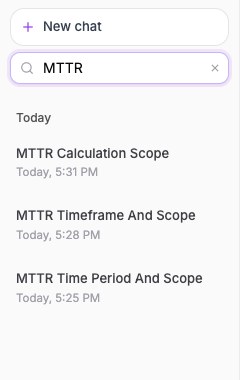
- Select New chat to start a fresh conversation.
- Type in Search conversations… to filter the list by title.
- Select a conversation to open it.
Search looks only at the conversations in the list. Older conversations do not appear.
Name a conversation
Oppex names a conversation from your first question, then replaces that name with a short title it writes for you. To change it, select the pencil beside the conversation in the list, or select the title at the top of the chat. Titles can be up to 120 characters.
Pin a conversation
Select the pin icon on a conversation to move it to Pinned. Select it again to unpin. Pinning changes only where the conversation appears in the list.
Privacy
A conversation belongs to you in the workspace where you started it. Other people in the workspace cannot see it. If someone opens the link to your conversation, Oppex tells them it does not belong to them.
Oppex does not offer a way to delete a conversation.