OpenSearch
Connect OpenSearch Alerting to an Oppex service so that a triggered monitor creates an incident. The monitor's action posts a JSON message to Oppex through a custom webhook, and you choose the message's fields with a Mustache template.
Before you start
You need the following:
- An Oppex API key from the workspace that owns the service. Open Settings, and in your workspace's section click API Keys. If your organization has only one workspace, click Organization → API Keys instead. See API Keys to create one.
- The service's integration key. Oppex shows it in the service's OpenSearch guide, as described in step 1.
- Access to OpenSearch Dashboards with the Alerting plugin enabled.
The OpenSearch guide inside Oppex says Settings > Account > API Keys. The API Keys page is under your workspace's section of Settings, as described above.
Step 1: Open the OpenSearch guide in Oppex
- Open Services.
- In the service's row, click Integration Details and select OpenSearch.
- In In Oppex: Get Your Service Key, click the copy icon to copy the service integration key.
Step 2: Create a webhook destination in OpenSearch
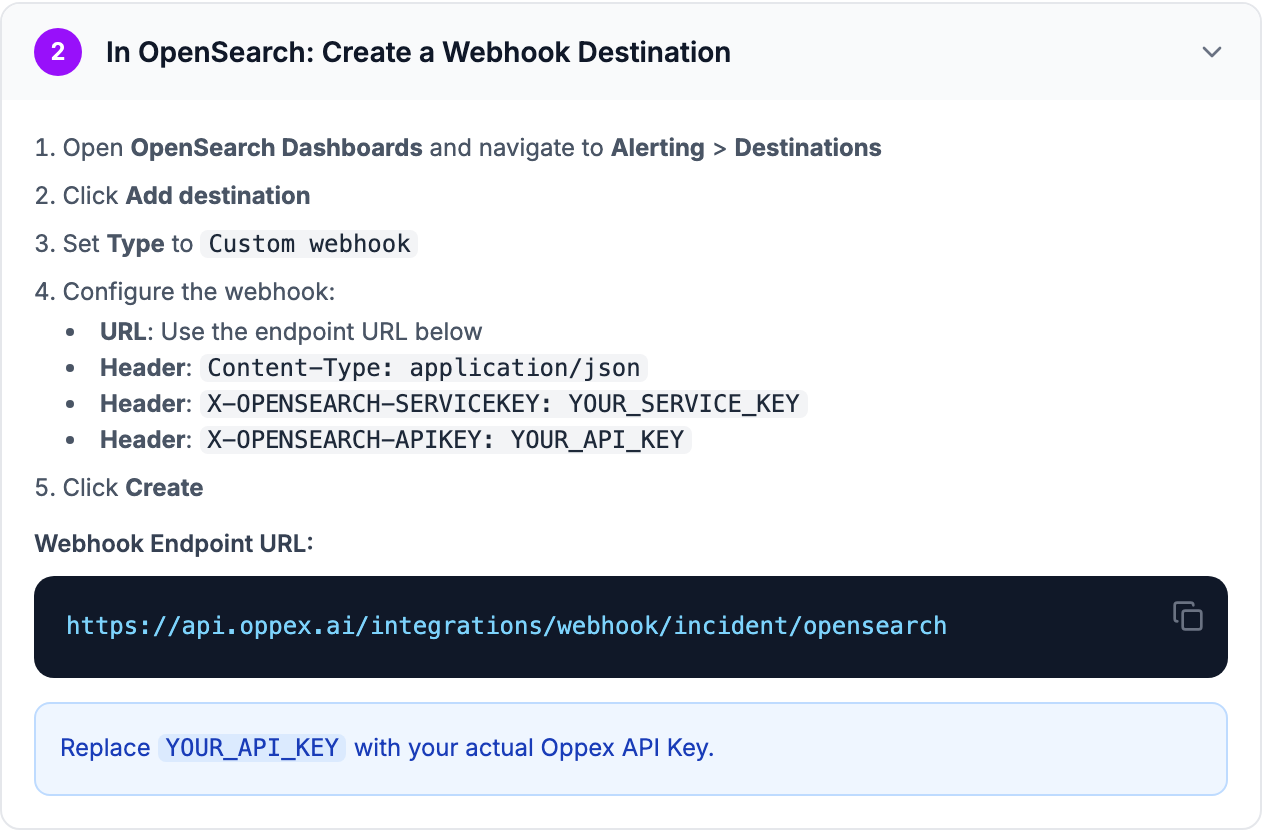
- Open OpenSearch Dashboards and go to Alerting > Destinations.
- Click Add destination.
- Set Type to
Custom webhook. - Configure the webhook:
- URL:
https://api.oppex.ai/integrations/webhook/incident/opensearch - Header:
Content-Type: application/json - Header:
X-OPENSEARCH-SERVICEKEY:followed by the service integration key from step 1 - Header:
X-OPENSEARCH-APIKEY:followed by your Oppex API key
- URL:
- Click Create.
In OpenSearch 2.0 and later, Alerting destinations are replaced by notification channels. Create a channel of type Custom webhook under Notifications > Channels with the same URL and headers, and select the channel in the monitor's action.
Step 3: Create or edit a monitor
- Go to Alerting > Monitors.
- Click Create monitor, or edit an existing monitor.
- Configure the monitor's query. Per-query, per-bucket, per-cluster metrics and per-document monitors all work.
- Add a Trigger with the condition you want.
- Under Actions, select the webhook destination from step 2.
- Set Message body to the template in step 4.
Step 4: Configure the message body
Use this Mustache template as the action's message body. It maps OpenSearch alert fields to the fields Oppex reads.
{
  "title": "{{ctx.monitor.name}}: {{ctx.trigger.name}}",
  "severity": 1,
  "priority": 1,
  "srcTimestamp": "{{ctx.periodEnd}}",
  "component": "{{ctx.monitor.name}}",
  "group": "{{ctx.monitor.name}}",
  "type": "alert",
  "externalID": "{{ctx.alert.id}}",
  "detailsJSON": "{{ctx.results.0}}"
}
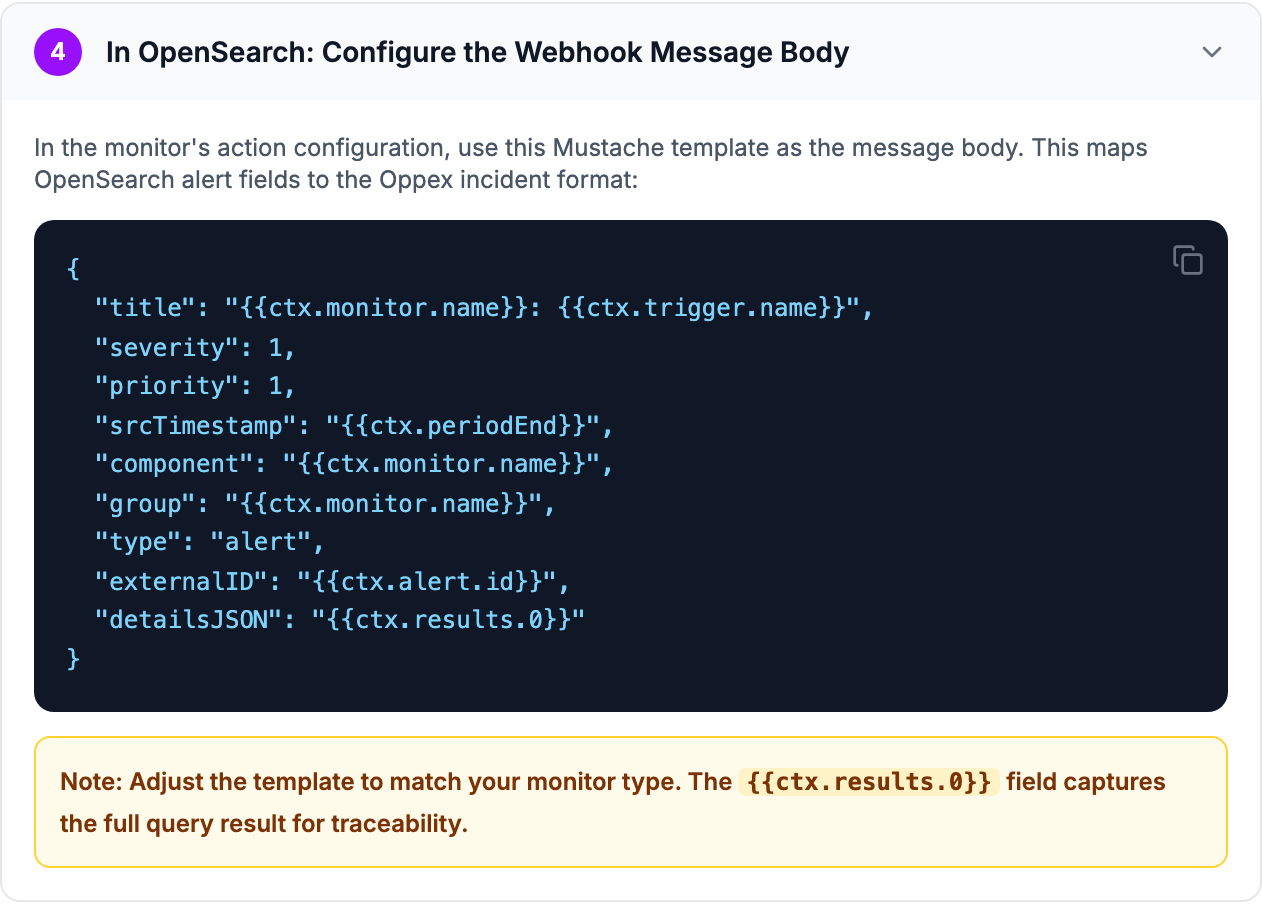
Adjust the template to your monitor type. The {{ctx.results.0}} value carries the monitor's query
result into the incident details.
Message fields
| Field | Required | Description |
|---|---|---|
title | Yes | The incident title |
srcTimestamp | Yes | When the alert happened, as an ISO-8601 timestamp such as 2026-10-08T18:52:13.877Z |
severity | No | Severity 1 to 5. Defaults to 1 |
priority | No | Priority 1 to 5. Defaults to 1 |
component | No | The affected component or resource |
group | No | A group name. Alerts with the same group attach to the open incident |
type | No | The alert type, for example metric_alert |
externalID | No | The OpenSearch alert ID |
detailsJSON | No | Extra alert details, kept with the incident |
tenant | No | A tenant name |
Oppex always records the source as OpenSearch, whatever the message contains.
Oppex uses the numbers you send without checking the range. Send whole numbers from 1 to 5, where 1 is the most critical. A missing or zero value becomes 1.
What happens when OpenSearch sends an alert
Each message creates an incident on the service. If srcTimestamp cannot be read as a timestamp,
Oppex records the time it received the alert instead.
With the template above, group is the monitor name. While a monitor's first incident is open,
further alerts from the same monitor attach to that incident instead of opening new ones. After the
incident is resolved, or after the workspace's grouping time window passes, the next alert opens a
new incident. See Grouping strategy.
Without a group, every alert opens its own incident.
Oppex accepts the details value as a JSON object, a JSON string, or the {key=value} text that
OpenSearch produces for query results, and shows it in the incident details.
Test the integration
Run the monitor from OpenSearch Dashboards, or send a sample alert with curl. Replace the two keys
first.
curl -X POST "https://api.oppex.ai/integrations/webhook/incident/opensearch" \
  -H "Content-Type: application/json" \
  -H "X-OPENSEARCH-SERVICEKEY: YOUR_SERVICE_KEY" \
  -H "X-OPENSEARCH-APIKEY: YOUR_API_KEY" \
  -d '{
    "title": "Owl Post Queue Delayed",
    "severity": 2,
    "priority": 2,
    "srcTimestamp": "2026-10-08T18:52:13.877Z",
    "component": "owl-post-worker",
    "group": "owl-post-queue-monitor",
    "type": "metric_alert",
    "externalID": "alert-001",
    "detailsJSON": "{\"monitor\":\"Owl Post Queue\",\"trigger\":\"Queue depth > 500\"}"
  }'
Oppex replies "Incident created successfully", and a Severity 2 incident appears on the Incidents page within a few seconds.
If a request fails, the reply tells you why:
| Reply | Cause |
|---|---|
| Missing or invalid Authorization header or cookie | The X-OPENSEARCH-APIKEY header is missing |
| Invalid or disabled API key | The API key is wrong or disabled |
| X-OPENSEARCH-SERVICEKEY header is required | The service key header is missing |
| Service not found for provided key | The service integration key does not match a service |
| Field 'title' is required | The message has no title |
| Field 'srcTimestamp' is required | The message has no timestamp |
In-product guide
Oppex shows the same setup steps inside the product, with your service's integration key and a sample request filled in. Open Services, click Integration Details in the service's row, and select OpenSearch.