Invite a user
- Open Settings → Users & Roles.
- Click + Invite User.
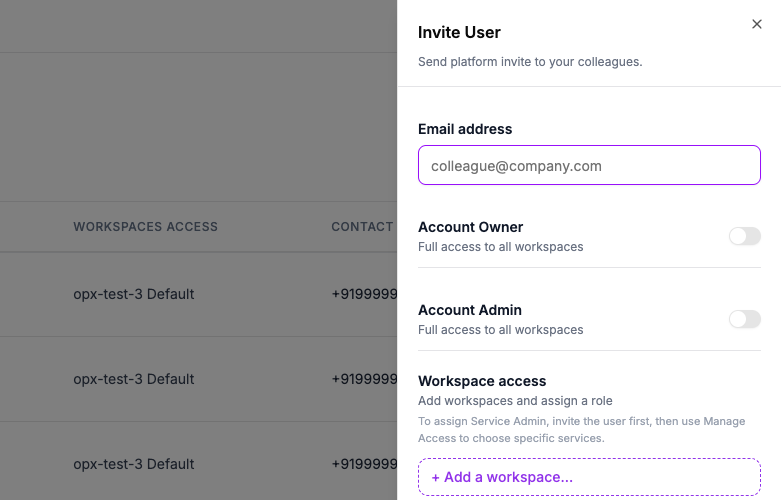
- Enter their Email address.
- Choose their access:
- Turn on Account Owner or Account Admin for full access to every workspace, or
- Under Workspace access, click + Add a workspace... and assign them Responder or Workspace Admin in that workspace.
- Click Send Invite.
Service Admin isn't offered here
To make someone a Service Admin, invite them first with any other access, then open Manage Access on their row and assign it there along with the specific services they'll administer.
Invites only reach your organization's approved email domain
An invite to an email outside your organization's whitelisted domain is rejected.
An invite expires after 7 days. Send a new one if it lapses before the person accepts.
Who can invite whom
You can only invite someone up to your own role — never higher:
| Your role | Can invite up to |
|---|---|
| Responder | Can't invite anyone |
| Service Admin | Service Admin |
| Workspace Admin | Workspace Admin, only in a workspace you administer |
| Account Admin | Account Admin |
| Account Owner | Any role |