Manage access & roles

Change someone's role or access​

  1. Open Settings → Users & Roles.
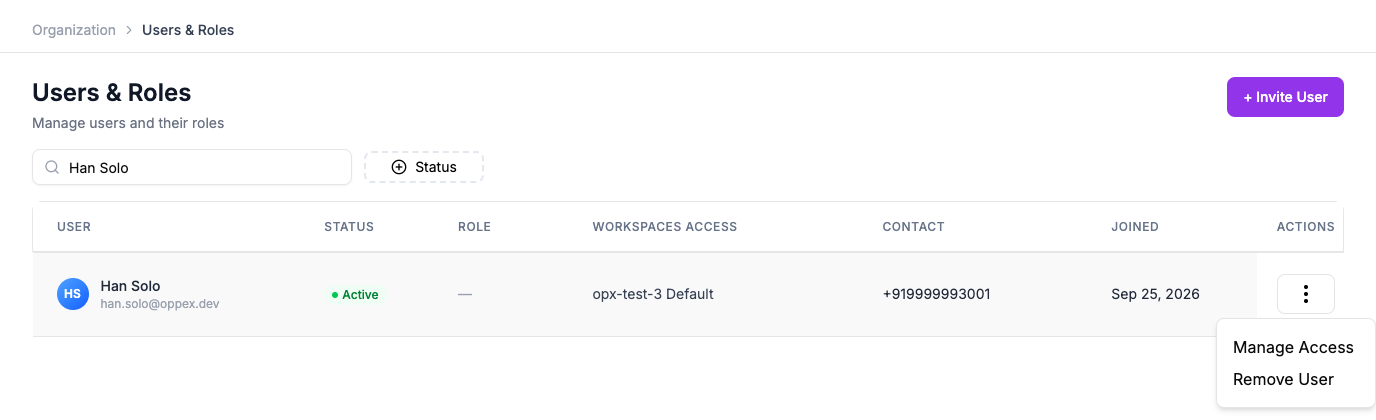
  2. Find the person and click the ⋮ menu on their row.
  3. Click Manage Access.

The row actions menu showing Manage Access and Remove User

  1. Make your change:
    • Turn on Account Owner or Account Admin for full access to every workspace, or
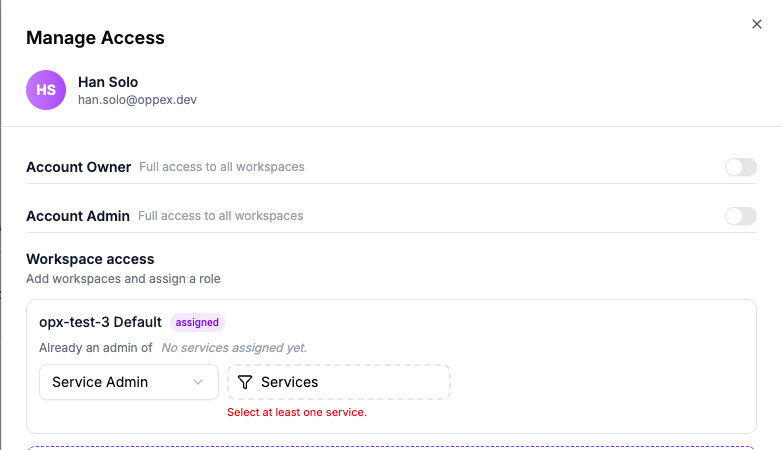
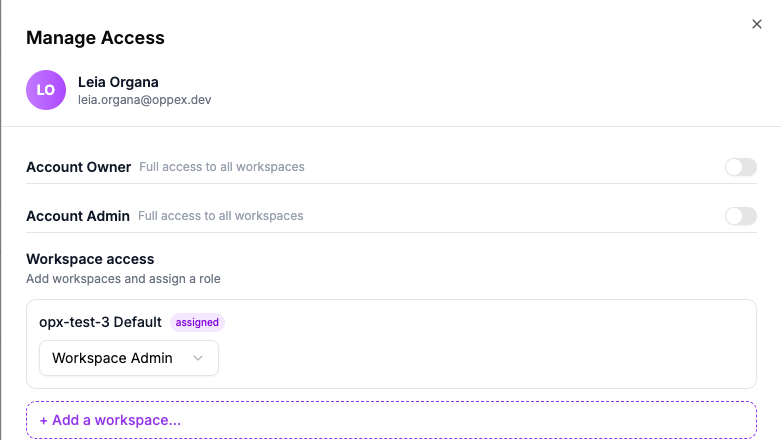
    • Under Workspace access, add a workspace and set their role there. Choosing Service Admin also requires picking at least one service — the panel blocks the save until you do.
  2. Click Save Changes.

Manage Access for a Service Admin, showing the required Services picker and its validation message

Manage Access for a Workspace Admin, which needs no service selection

Promoting someone to Account Owner or Account Admin applies everywhere immediately

It replaces their access in every workspace, not just the one you're looking at. There's no way to grant Account Owner or Account Admin for a single workspace only.

Account Owner and Account Admin can't be downgraded here

Oppex refuses the change. Promote someone else to Account Owner first, or remove the person instead.

You can't change your own role

Ask another Account Owner or Account Admin to do it for you.

Remove a user​

  1. Open the same ⋮ menu on their row.
  2. Click Remove User.

Removing an Account Owner or Account Admin isn't allowed from here — demote isn't possible either, so transfer their responsibilities to someone else before removing them.

FAQ

If I change someone's Workspace Admin or Responder access, does it affect their other workspaces?

No. That change only applies to the workspace you set it in — their access to any other workspace stays exactly as it was.

Why does saving a Service Admin change get blocked?

Service Admin requires at least one service. The panel shows "Select at least one service" until you pick one.

Can I remove an Account Owner or Account Admin?

No. Promote someone else, or contact another Account Owner to make the change first.

In this article

FAQ

If I change someone's Workspace Admin or Responder access, does it affect their other workspaces?

No. That change only applies to the workspace you set it in — their access to any other workspace stays exactly as it was.

Why does saving a Service Admin change get blocked?

Service Admin requires at least one service. The panel shows "Select at least one service" until you pick one.

Can I remove an Account Owner or Account Admin?

No. Promote someone else, or contact another Account Owner to make the change first.