
Escalation by severity

A service doesn't have one escalation policy — it has one per severity level. When an incident comes in, Oppex looks at its severity and follows whichever policy that level is mapped to.

Set the mapping​

  1. Open the service and find Map Escalation By Severity.
  2. For each severity level, either:
    • Choose an escalation policy from Mapped Escalation Policy, or
    • Click the bell icon to mark it Do Not Escalate.
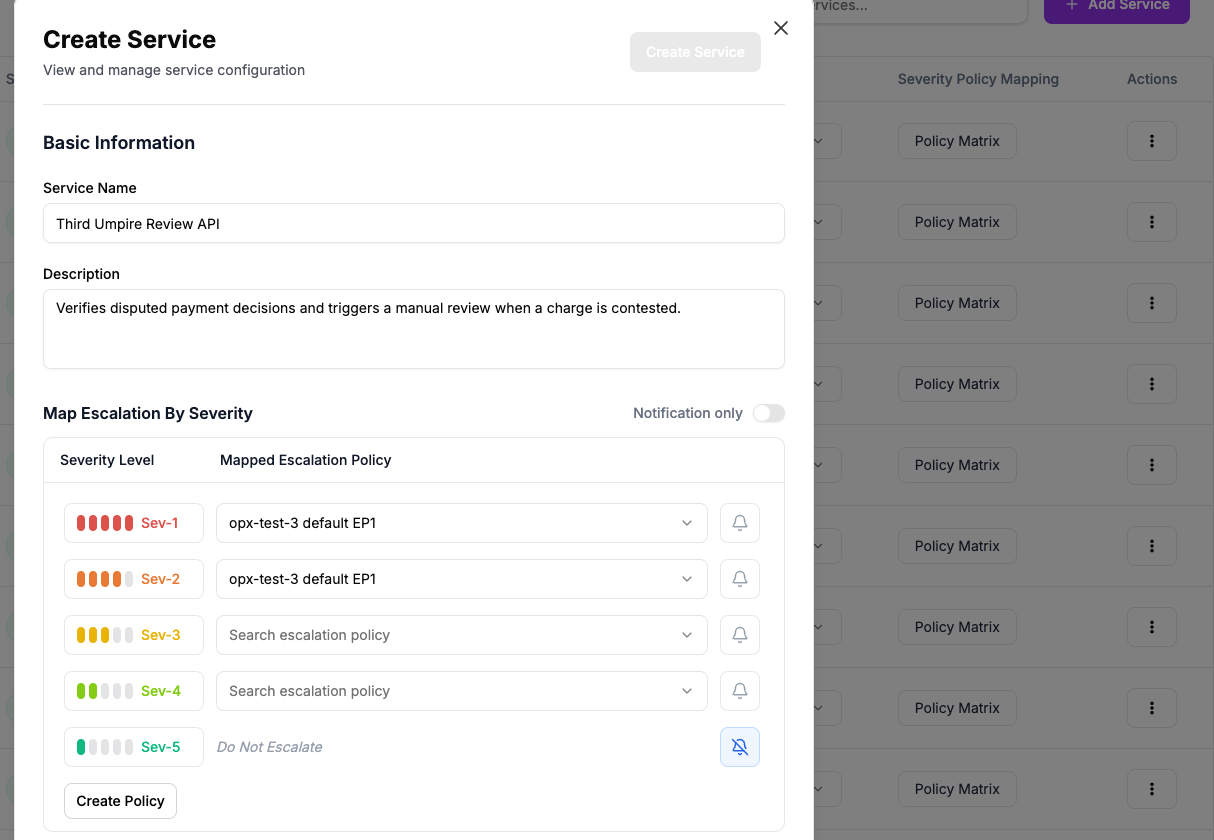
The severity mapping table: Sev-1 and Sev-2 mapped to a policy, Sev-3 and Sev-4 unmapped, Sev-5 set to Do Not Escalate

For example, a Third Umpire Review API service might map Sev-1 and Sev-2 to its most urgent escalation policy, and set Sev-5 to Do Not Escalate — a Sev-5 incident still gets created and shows up in the incident list, but nobody is paged for it.

Do Not Escalate still creates the incident

It just never assigns or pages anyone. The service's own notification settings — email or Slack — still fire regardless of the severity's escalation setting.

FAQ

Can two severity levels share the same escalation policy?

Yes. There's no restriction on reusing one policy across multiple severity levels.

What happens if I leave a severity level unmapped?

Oppex won't let you save the service — every level needs either a policy or Do Not Escalate.

Does priority affect this mapping?

No. Only severity drives escalation. See Severity and Priority.

In this article

FAQ

Can two severity levels share the same escalation policy?

Yes. There's no restriction on reusing one policy across multiple severity levels.

What happens if I leave a severity level unmapped?

Oppex won't let you save the service — every level needs either a policy or Do Not Escalate.

Does priority affect this mapping?

No. Only severity drives escalation. See Severity and Priority.