Derived variables
A derived variable stores a clean value next to the value of another workspace variable. If an incident carries the cluster asiacrm, a derived variable can store asia beside it, so a filter or a report sees one name where it used to see several spellings. The original value is never changed.
You write the mapping yourself, as one or more map(...) functions. Oppex checks it as you type and shows what it does to your recent values before you save. It does not guess groups for you, and it does not use AI.
You need the Workspace Admin role or higher to create and manage derived variables.
Create a derived variable
Before you start, the workspace needs a variable of the type String or Array of String that already has values on recent incidents, for example ops.cluster. A parser fills it.
- Open Settings, then your workspace, then Variables.
- Click Add Variable.
- Enter a Name, and optionally a Description.
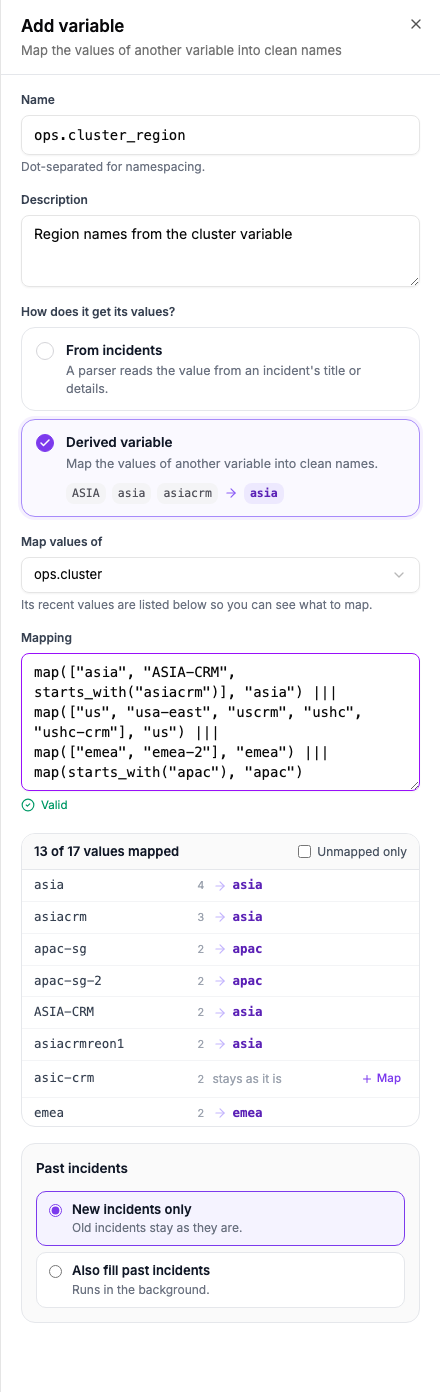
- Under How does it get its values?, select Derived variable.
- In Map values of, choose the variable whose values you want to map.
- Write the Mapping. The next section explains how.
- Read the preview under the box, and fix the mapping until it looks right.
- Choose whether to fill past incidents, then click Add variable.
The variable is on as soon as you save it. New incidents get the mapped value within about a minute.
Write the mapping
A map function turns the values in its list into one value:
map(["us", "ushc", "ushc-crm"], "us")
The list holds the inputs, and the last item is the output. Write several maps one after another, joined with |||. They may sit on separate lines:
map(["asia", "ASIA-CRM", starts_with("asiacrm")], "asia") |||
map(["us", "usa-east", "ushc"], "us") |||
map(starts_with("apac"), "apac")
- An input is a value in double quotes, or
starts_with("text")for every value that begins with that text. - A single input can be written without the brackets, as in
map(starts_with("apac"), "apac"). - The output is a name in double quotes. Use
\"for a quote and\\for a backslash inside text. - Capital letters, extra spaces (of any kind) and invisible characters do not matter when Oppex compares a value with an input. Spaces at the start or end of an input are ignored too, so
starts_with("asia ")is the same asstarts_with("asia"). - Oppex tries
starts_withinputs in the order you wrote them, so write the longer start first. Astarts_withthat an earlier one already covers, such asstarts_with("ab")afterstarts_with("a"), can never match, and Oppex refuses to save it. - An output can be used by one map only, and an input can belong to one map only.
- A value that no map lists keeps its own value.
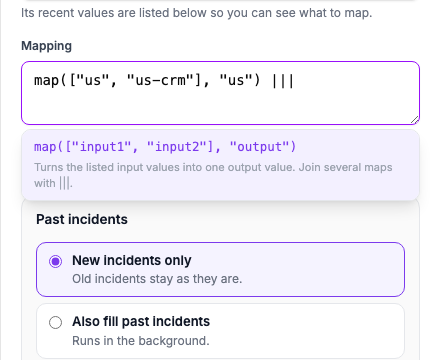
Click in the box where a function can start, which is an empty box or the place after |||, and Oppex offers map. You can also type a few letters of the name, such as ma. Use the arrow keys and Enter, or click, to insert it. Oppex writes map(["input1", "input2"], "output") and selects input1, so you can type your first input at once.
Under the box, Oppex says Valid or tells you what is wrong, for example Map 2: expected ',' (line 2, column 14). You cannot save a mapping that is not valid.
Read the preview
The preview under the box lists the most common values of the variable you map from the last 30 days, with the number of incidents that carry each, and what the mapping makes of it. The header says how many values a map lists, for example 13 of 18 values mapped.
- A value no map lists shows stays as it is. Select + Map beside it to add a map for that value to the end of your mapping, then change its output to the name you want.
- Select Unmapped only to see only the values that still need a map.
The preview reads up to 2,000 values and shows the first 100. It updates when the mapping is valid and you pause typing. While the mapping is not valid, the last preview stays on the screen, dimmed, with the label Out of date. Updating… shows while Oppex reads a new one.
Fill past incidents
New incidents get the mapped value on their own. Under Past incidents, choose Also fill past incidents to write it on incidents that already exist, then choose how far back to go: 7 days, 30 days, 90 days, 180 days or Custom. The button changes to Add and fill, and the fill starts when you save. If the fill cannot start, the variable is still saved and Oppex tells you so.
Editing a mapping changes what new incidents get. Incidents that already carry the old mapped values keep them unless you fill. When you edit a mapping and choose Also fill past incidents, the card asks Which incidents. All incidents is selected, because changing a mapping changes values that are already stored. Only empty ones keeps the values that are there.
You can also fill later. Open the menu at the end of the row and select Fill past incidents…. It is greyed out while the variable is switched off.
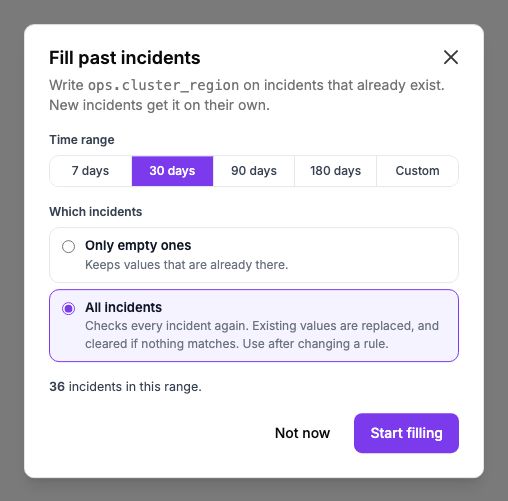
Follow the fill in Backfill history, as described in Fill past incidents. A fill covers at most 180 days. While a derived variable is on, every new incident gets the mapped value, and an incident whose value no map lists gets the original value copied. That is why an edit starts on All incidents.
Find, edit and switch off a derived variable
On the Variables page, a derived variable carries a Derived label and the line Maps with the variable it maps. The Filled by column shows how many maps it holds.

- Select the number of maps, or Edit derived variable in the row menu, to change the mapping or the description.
- Select Switch off to stop writing the mapped value. Values already stored on incidents stay. Switch on starts it again.
- Select Delete to remove the derived variable. Values already stored on incidents are not erased.
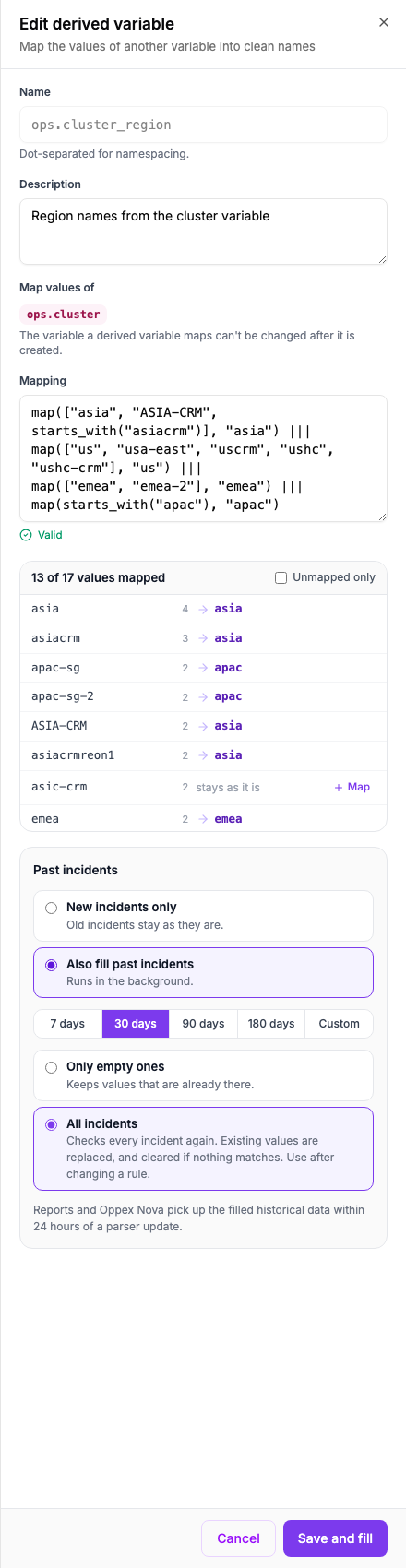
The name, the variable it maps and its function cannot change after you create it. To map another variable, create a new derived variable.
How a value gets its mapped value
Oppex compares a value with every input of every map, ignoring capital letters, extra spaces, tabs, line breaks and invisible characters. An exact input always wins over a starts_with input. Among starts_with inputs, the first map in your text wins. A value that matches nothing keeps its own value. When the variable holds a list, Oppex maps each item and removes duplicates.
Here is a mapping applied to the values in the picture above:
Value of ops.cluster | Value of ops.cluster_region | Why |
|---|---|---|
ASIA-CRM | asia | It is listed as an exact input of the asia map, and capital letters do not matter. |
asiacrmreon1 | asia | It starts with asiacrm, which starts_with("asiacrm") matches. |
apac-sg | apac | It starts with apac, which starts_with("apac") matches. |
ushc-crm | us | It is listed as an exact input of the us map. |
asic-crm | asic-crm | No map lists it, so it keeps its own value. |
Rules and limits
- A variable can have at most 1,000 maps, 5,000 inputs and 500
starts_withinputs in all. The whole mapping can be up to 100,000 characters. - An output can be up to 256 characters, and an input can be up to 512 characters.
- The variable you map must be a String or Array of String variable. You cannot map a derived variable.
- A workspace can have up to 50 derived variables.
- A Service Routing rule cannot set a derived variable, because its value always comes from its mapping.
- Oppex refuses to delete a variable while a derived variable maps it, and the message names the derived variable. Delete the derived variable first.
- A parser cannot fill a derived variable, and you cannot limit a derived variable to services.
- A derived variable that is switched off writes nothing. Saving a new mapping does not switch it on again.
- The mapped value appears in the Variables filter on the Incidents page, next to the original.