Workspace parsers
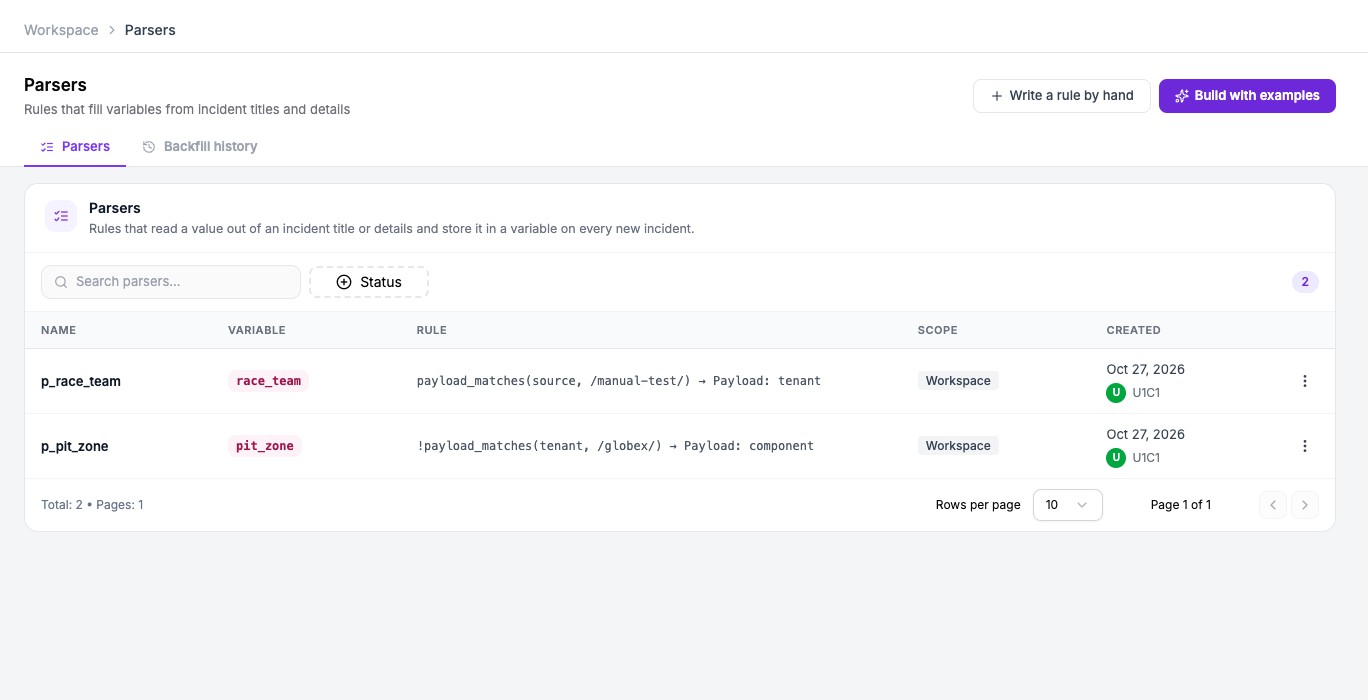
A parser reads a value out of an incident and stores it in a workspace variable. It has two parts: a condition that decides whether the parser applies to an incident, and an extract rule that picks the value. A parser runs on every new incident in the workspace.
If you would rather point at a value than write the rule, see Build a parser with examples.
Write a parser by hand
- Open Settings, then your workspace, then Parsers.
- Click Write a rule by hand.
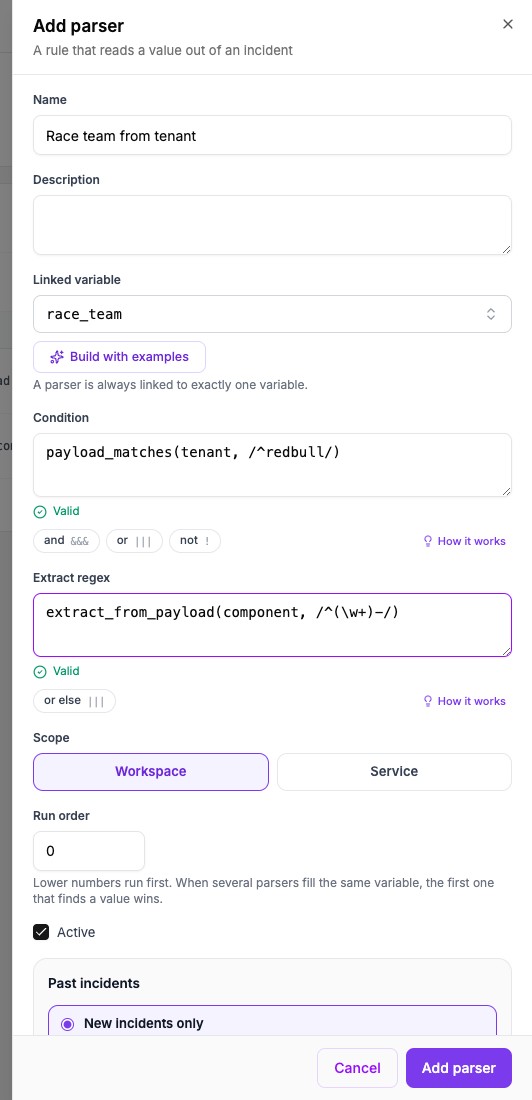
- Enter a Name. Parser names are unique in a workspace.
- Choose the Linked variable. A parser fills exactly one variable.
- Optionally enter a Condition. With no condition, the parser applies to every incident.
- Enter the Extract regex.
- Choose the Scope: Workspace or Service.
- Set the Run order, keep Active ticked, and click Add parser.
The condition
A condition tests the incident. It uses these functions:
| Function | What it tests |
|---|---|
title_matches(/regex/) | The incident title. |
details_matches(path, /regex/) | One field in the incident details, named by its dotted path, for example resource.namespace. |
payload_matches(field, /regex/) | One of the incident's own fields. See Use incident fields in rules. |
Join functions with &&& (and) and ||| (or), write ! directly before a function to negate it, and group with ((( and ))). Regular expressions are case-sensitive. Start one with (?i) to ignore case.
The extract rule
An extract rule uses extract_from_title(/regex/), extract_from_details(path, /regex/) or extract_from_payload(field, /regex/). The regular expression must contain parentheses, and the text inside the first pair becomes the value. A regular expression without parentheses finds no value.
Join several extract rules with ||| to try them in order. Oppex uses the first one that finds a value. The &&& operator and ! are not allowed in an extract rule.
Oppex checks both boxes as you type. A green Valid appears when the rule is acceptable, and an error names the problem otherwise.
Example
Suppose you want the lap number from titles such as Safety Car deployed on lap 23.
| Box | Value |
|---|---|
| Condition | title_matches(/(?i)safety car/) |
| Extract regex | extract_from_title(/lap (\d+)/) |
For that title, the condition matches and the variable receives 23. A title that does not contain safety car is skipped, and a title that does but has no lap number stores nothing.
When several parsers fill one variable
Run order decides who goes first. Lower numbers run first, and the first parser that finds a value wins. Parsers with the same number run in the order they were created. A parser also runs only on incidents from services that both the variable and the parser cover.
Limits
- Each regular expression has a short time limit. An expression that runs too long counts as no match.
- All parsers together have about one and a half seconds for one incident. Parsers that have not run by then are skipped for that incident.
- For an array variable, Oppex keeps up to 50 matches. A single match that contains commas is split on the commas.
- Changes to a parser reach new incidents within about a minute.
- A parser fills new incidents only. To fill older ones, use Fill past incidents.
Manage parsers
Open a row menu to View, Edit, Improve with examples, Fill past incidents…, View fill history, Activate or Deactivate, and Delete. Only Workspace Admins and above can change parsers.